

Outlook Express, formerly known as Microsoft Internet Mail and News, was a discontinued email and news client developed by Microsoft. Outlook Express is different from Microsoft Outlook. Although their names are similar, both applications use completely different codebases.
Outlook Express uses the Windows Address Book to store contact information and integrates closely with it. On Windows XP, it also integrates with Windows Messenger.
Step 1: Start Microsoft Outlook Express
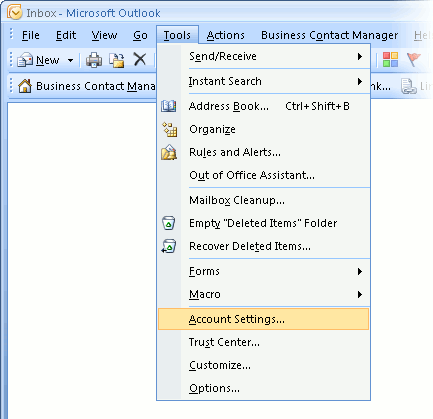
Open Outlook Express, click on Tools, then select Account Settings from the menu bar.
Step 2: Select the Email Account
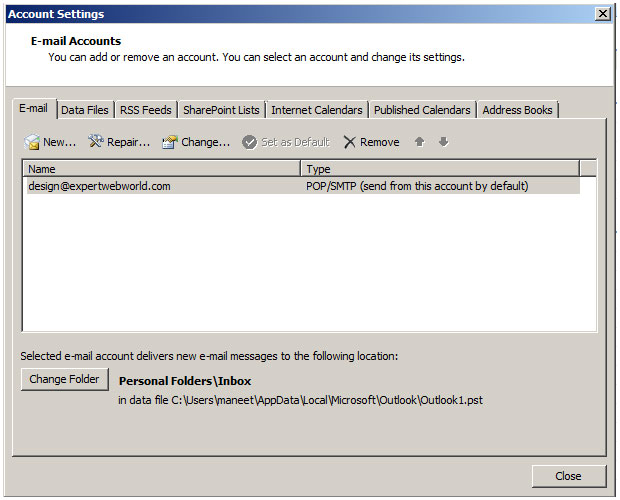
Highlight the email account you want to modify, then click Change to open the account settings window.
Step 3: Change Email Account Window
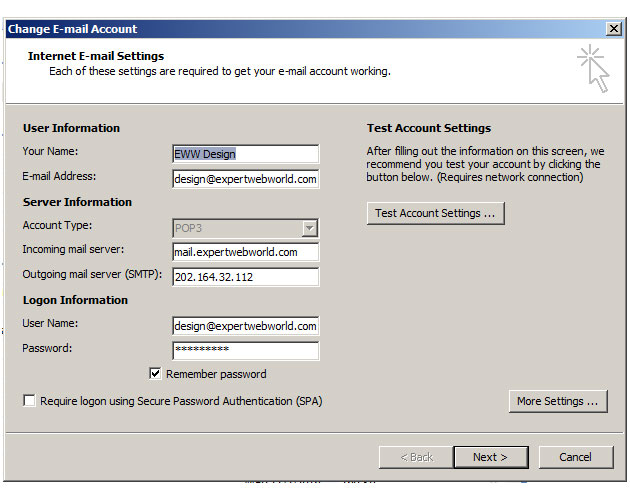
The “Change Email Account” screen will appear as shown below.
Step 4: Open Internet Email Settings
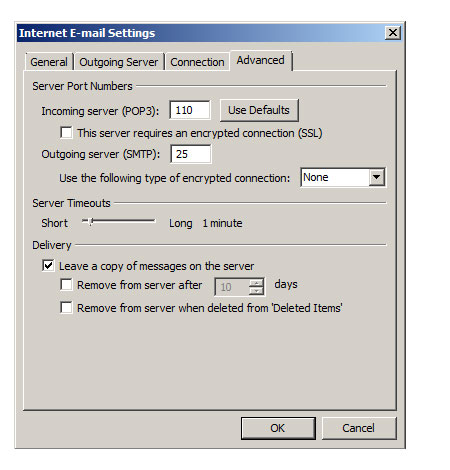
Click on Advanced Settings and check the option “Leave a copy of messages on the server”.
To prevent emails from staying on the server indefinitely (which may slow email performance and consume disk space), enable “Remove from server after X days”. Choose a suitable number of days (for example, 30–100 days).
Step 5: Save and Close Settings
Click OK to close the Internet Email Settings window. Then click Next and Finish to apply the changes.